This post is part of the ongoing Phone in a Box series—catch up with the previous posts here and here.
In this post, I describe why and how I built a clipboard sharing service for my personal use.
Table of contents
Open Table of contents
The Backstory
I realised lately that I do a lot of context switching between my devices, specifically my android and my mac (my primary devices for work and personal use). This means a lot of copy pasting content between the devices, mostly through messaging services like telegram and signal.
While this works well, it was also a bit too distracting and cluttering for my workflow. And since I already built a way to sync my SMS, links and bookmarks through cloudflare workers, I decided to extend it to clipboard as well.
The How
I envy the universal clipboard feature of apple ecosystem. I understand that there’s downsides to it, apart from the obvious ones like walled ecosystem, not being able to use it on other platforms (and without an apple account/logins), is a big one for me.
Daily driving an android myself, I wanted to see how close I can get to implementing this feature from scratch.
The easy part was building serverless REST endpoints on cloudflare workers that store and retrieve a given blob of text (backed by D1 for storage).
The Android side
I found this amazing FOSS app call HTTP Shortcuts, which lets you build your own scripting and automate actions on android.
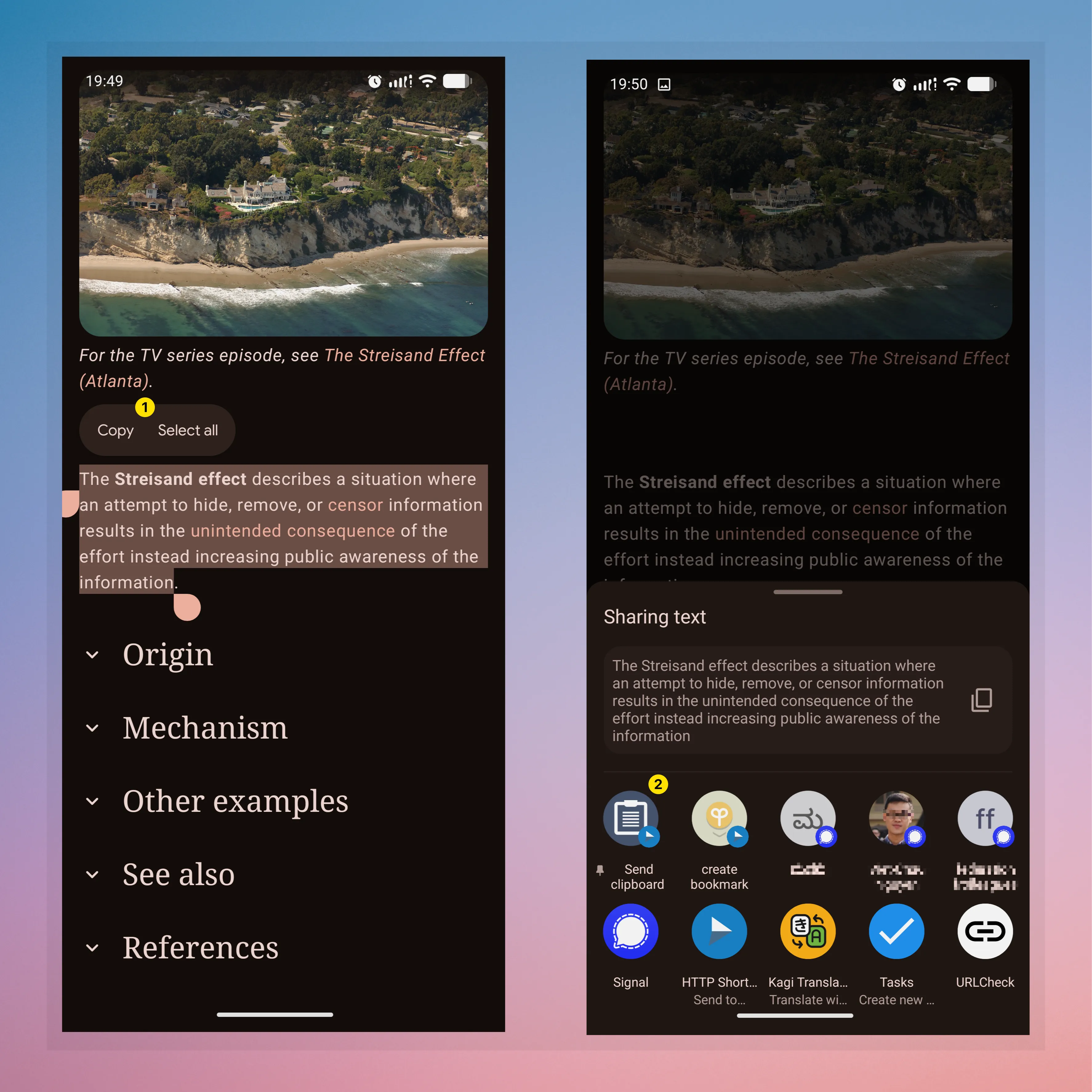
What’s cool is now I can share text to it, like I would share it to a contact or an app, and it will forward it to my endpoint. On the other hand, getting the clipboard is also the same, except it will automatically copy the content from the remote endpoint to my android clipboard.
Here’s how it looks like to share the clipboard (numbered the steps):
And here’s how it looks to get the clipboard:
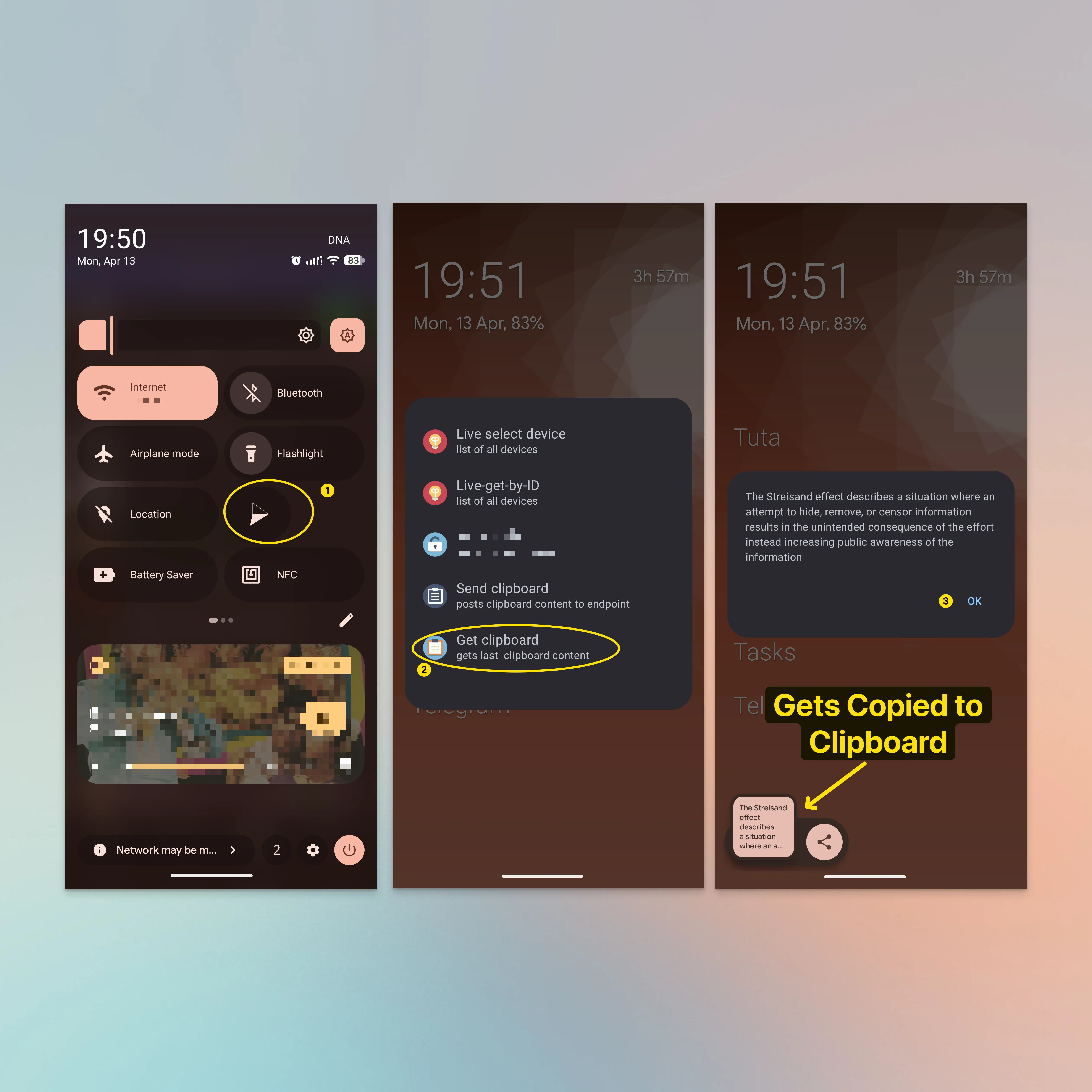
Right now, Its just 2 clicks (through the share menu or the quick settings menu) to set or get the clipboard, but all without having to open any app manually, i.e, HTTP Shortcuts handles the workflow without having to context switch from the current app in focus, which is a big win for me (compared to me having to open the messaging app of choice, selecting the chat, pasting the content and switching back to previous app).
The macOS Side

There’s probably a million ways to wrap a REST endpoint, including apple’s own native Automator app. Since I am currently using Raycast on my mac (as an alternative to spotlight), I decided to stick with it.
Initially, I thought i’d have to build an extension, or modify their existing extension for clipboard. But looking at my use-case, using scripts feature made more sense.
The script itself is a bash script which just runs a curl command against my endpoint.
#!/bin/bash

# Required parameters:
# @raycast.schemaVersion 1
# @raycast.title Get Clipboard
# @raycast.mode compact

# Optional parameters:
# @raycast.icon 🤖
# @raycast.packageName clipboard

# Documentation:
# @raycast.description gets latest clipboard

#!/bin/bash
# Configuration
URL="https://api.example.dev/cb"
TOKEN="secret"
# Fetch and extract content
# -s: silent mode
# -H: adds the Authorization header
# jq -r: extracts the raw string from the first element of the data array
content=$(curl -s -X GET "$URL" \
  -H "Authorization: Bearer $TOKEN" | jq -r '.data[0].content')
# Check if content was found
if [ "$content" != "null" ]; then
  echo "$content"
else
  echo "Error: Could not retrieve clipboard content."
  exit 1
fi
A similar script can be used to send clipboard to the endpoint as well. Raycast also accepts an argument through its UI and passes it to the script!
This is how the workflow looks like to get the clipboard:
The Verdict
I’ve been using it for a week now and its pretty intuitive, I like it. I know that its not the same as the one from apple, but its good enough for me. I also get to mindfully share content into the remote clipboard instead of everything that is copied on either devices, which I would like to think of it as a sane default, security and privacy wise.
For now, i’m working on client side encryption (so that only encrypted blob gets stored in the database) and trying to see if its worth reducing the number of clicks required for each operation.
Until next time!